Whole-Class Set Worksheet Generator
Paste your entire classroom roster. Generate personalized name tracing and practice sheets for every student in a single printable PDF.
- Target Learners
- Elementary Teachers, Homeschool Co-ops, Daycares
- Inputs
- Roster of up to 40 names (pasted from Sheets/Excel)
- Output Format
- Multi-Page Collated Vector PDF & Batch Print
- Guidelines
- U.S. 3-Line (1.0″ Pre-K through 0.375″ Grade 2/3)
- Cost & Account
- Free • No Login
- Student Privacy
- 100% In-Browser Roster Processing • Zero Server Upload
🎒Classroom Roster
One name per line. Maximum 40 students per batch.
FERPA & Student Privacy Friendly
Student names pasted here are parsed and rendered strictly inside your browser memory. No student names or school rosters are uploaded to our servers or stored in any database.
Alexander's Handwriting Practice
Trace carefully along the dashed lines
How to Print Class Sets Quickly
1. Copy from Sheets
Highlight your column of student names in Google Classroom, PowerSchool, or Excel, copy with Ctrl+C, and paste directly into the box.
2. Single-Sided Printing
Ensure your printer dialog is set to Single-Sided so each student receives their own clean, uncreased practice sheet.
3. Alphabetical Collation
Leave Sort A–Z enabled to have sheets print in alphabetical order, making morning cubby or desk distribution effortless.
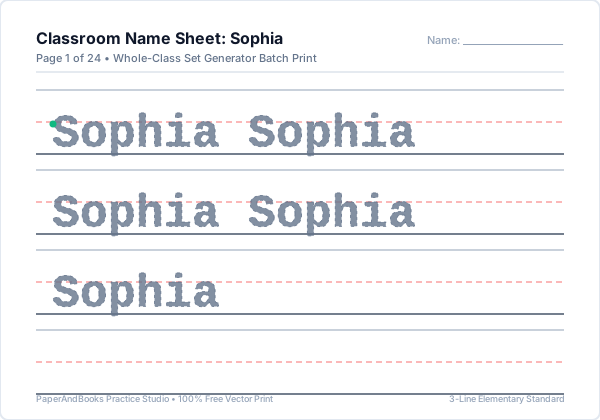
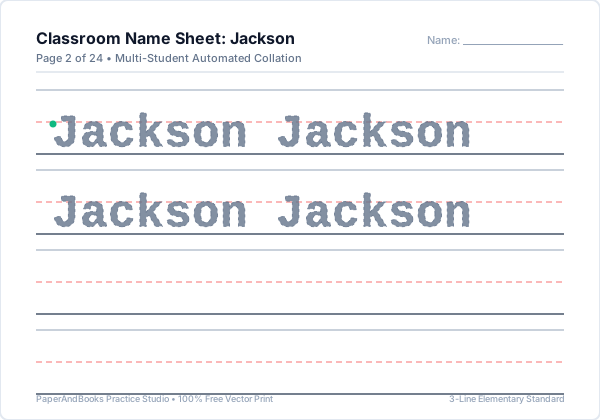
Real Worksheet Output Previews
Sample vector outputs generated by Whole-Class Set Generator. Razor-sharp at 1200+ DPI with standard U.S. elementary 3-line ruling.
How to Print or Save as PDF
Follow these printer settings to ensure standard elementary guidelines print at their exact calibrated physical dimensions (1.0″, 0.75″, 0.50″, or 0.375″):
- 1. Click Print / Save PDFClick the blue button above the preview window to trigger your browser's native vector print engine.
- 2. Destination SelectionChoose your physical classroom/home printer, or select "Save as PDF" to export a high-resolution file.
- 3. Paper Size & Scale 100%Select US Letter (8.5 × 11″) or A4. Set Scale to "100%" or "Actual Size"—avoid "Fit to Printable Area" to preserve exact ruling height.
- 4. Enable Background GraphicsUnder More Settings, check "Background graphics" to ensure dashed midlines and colored guide dots print with maximum contrast.
Frequently Asked Questions
Common questions about ruling specifications, classroom use, and pedagogical mechanics for Whole-Class Set Generator.
How many student names can I paste into the roster at once?▼
The tool supports rosters up to 40 students per batch, comfortably accommodating standard preschool, kindergarten, and elementary classroom sizes.
Can I paste names directly from a spreadsheet like Google Sheets or Excel?▼
Yes. Simply copy a single column of student names from Google Sheets, Microsoft Excel, or your school information system and paste them directly into the roster box.
Does the class generator create a single PDF or separate files?▼
It compiles all student sheets into one collated multi-page vector PDF. You can send the entire document to your school copier in a single print job.
Are student names stored on your servers or shared with third parties?▼
Never. The class set generator executes 100% inside your web browser. Student names are never transmitted to any external server, database, or analytics tracker.
Can I set different line ruling sizes for different students in the roster?▼
The ruling height selected applies across the full batch to ensure consistency for your grade level. For individualized tiering, you can run separate batches for preschool (1.0″) and kindergarten (0.75″).
Related Handwriting & Literacy Tools
Explore our complementary free elementary worksheet generators:
Fine-tune individual name worksheets with customizable middle and last names.
Create numbered spelling lists and test blanks for your classroom roster.
Generate customized practice sheets for specific classroom phonics units.
Print grade-level high-frequency word tracing packs for reading groups.