Handwriting Worksheet Generator
Create custom printable handwriting practice sheets for names, words, and sentences. Choose guidelines, tracing density, and grade-appropriate line heights.
- Target Learners
- Preschool, Kindergarten, 1st & 2nd Grade
- Inputs
- Custom names, words, sentences, vowel lists
- Output Format
- Print-ready 1200+ DPI Vector PDF & Print (Letter / A4)
- Guidelines
- U.S. Elementary 3-Line (1.0″, 0.75″, 0.50″, 0.375″)
- Cost & Account
- Free • No Login
- Student Privacy
- 100% In-Browser Execution • Zero Server Tracking
Enter a single name to repeat, or multiple lines for a list.
Names and text entered here are processed entirely inside your web browser. No student data is ever sent to any server, database, or analytics tracker.
Handwriting Practice
Trace the letters carefully along the lines
Real Worksheet Output Previews
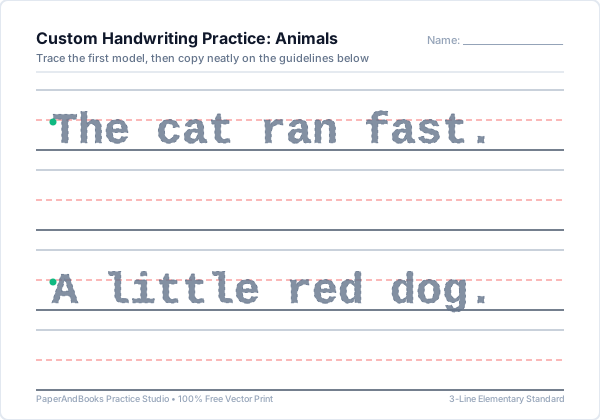
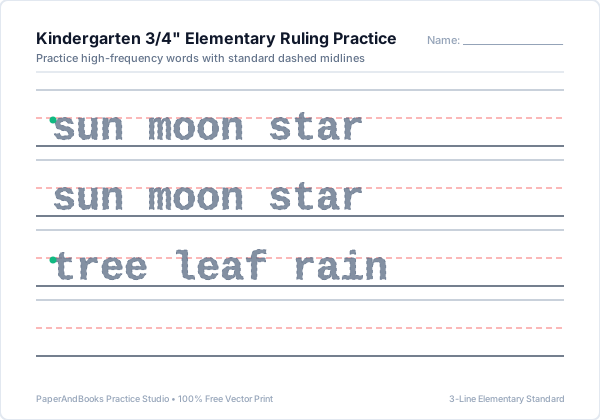
Sample vector outputs generated by Handwriting Worksheet Generator. Razor-sharp at 1200+ DPI with standard U.S. elementary 3-line ruling.
How to Print or Save as PDF
Follow these printer settings to ensure standard elementary guidelines print at their exact calibrated physical dimensions (1.0″, 0.75″, 0.50″, or 0.375″):
- 1. Click Print / Save PDFClick the blue button above the preview window to trigger your browser's native vector print engine.
- 2. Destination SelectionChoose your physical classroom/home printer, or select "Save as PDF" to export a high-resolution file.
- 3. Paper Size & Scale 100%Select US Letter (8.5 × 11″) or A4. Set Scale to "100%" or "Actual Size"—avoid "Fit to Printable Area" to preserve exact ruling height.
- 4. Enable Background GraphicsUnder More Settings, check "Background graphics" to ensure dashed midlines and colored guide dots print with maximum contrast.
Frequently Asked Questions
Common questions about ruling specifications, classroom use, and pedagogical mechanics for Handwriting Worksheet Generator.
How do I choose the correct guideline height for my student?▼
Use Preschool (1.0″) for ages 3–4 developing early grip stability. Choose Kindergarten (0.75″) for ages 5–6 mastering letter proportions with dashed midlines. Select 1st & 2nd Grade (0.50″ or 0.375″) for fluent writers learning compact word spacing.
What is the difference between Trace Only, Trace + Copy, and Full Progression?▼
Trace Only provides dashed model letters across every row. Trace + Copy provides one dashed guide row followed by one blank guideline row for independent recall. Full Progression gradually reduces guide intensity across rows to build unassisted handwriting confidence.
Can I enter multiple custom sentences across separate rows?▼
Yes. Simply type or paste your text into the custom text box. The generator automatically wraps sentences to fit the printable margins and preserves your line breaks as separate practice rows.
Are these guidelines compatible with Zaner-Bloser and D'Nealian curricula?▼
Our worksheets use standard U.S. elementary 3-line ruling featuring a solid top headline, dashed midline, and solid baseline, compatible with the visual layout styles taught in Zaner-Bloser and D'Nealian classrooms.
Why do starting guide dots appear on specific letters?▼
Green starting dots indicate the correct initial pencil placement for each character, reinforcing top-to-bottom stroke sequence and preventing bottom-up letter drawing habits.
Related Handwriting & Literacy Tools
Explore our complementary free elementary worksheet generators:
Create personalized single-name practice sheets with large preschool starting dots.
Practice capitalization, finger spacing, and end punctuation on elementary lines.
Turn weekly classroom spelling lists into numbered 1-to-15 practice sheets.
Download blank 3-line elementary paper with customizable line heights.