Sentence Tracing Generator
Practice sentence formation, capitalization, end punctuation, and finger spacing between words on standard elementary guidelines.
- Target Learners
- 1st Grade, 2nd Grade, Writing Fluency
- Inputs
- Full custom sentences, punctuation, multi-sentence lists
- Output Format
- Print-ready 1200+ DPI Vector PDF & Print (Letter / A4)
- Guidelines
- U.S. 3-Line (0.50″ Grade 1 & 0.375″ Grade 2/3)
- Cost & Account
- Free • No Login
- Student Privacy
- 100% In-Browser Execution • Zero Server Tracking
📝Custom Sentences
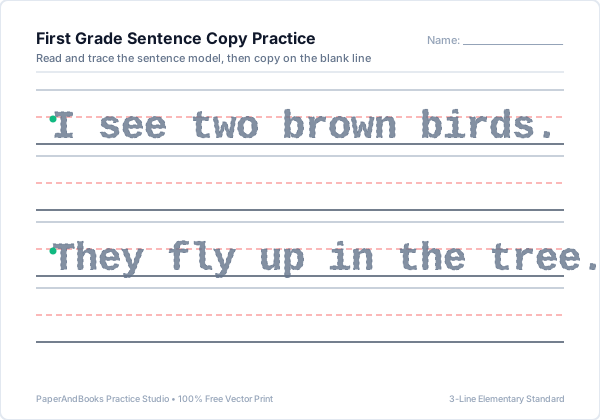
Each sentence generates a traced line followed by a blank copy line.
Sentence Handwriting Practice
Read the sentence, trace the words, and copy neatly below
Real Worksheet Output Previews
Sample vector outputs generated by Sentence Tracing Generator. Razor-sharp at 1200+ DPI with standard U.S. elementary 3-line ruling.

How to Print or Save as PDF
Follow these printer settings to ensure standard elementary guidelines print at their exact calibrated physical dimensions (1.0″, 0.75″, 0.50″, or 0.375″):
- 1. Click Print / Save PDFClick the blue button above the preview window to trigger your browser's native vector print engine.
- 2. Destination SelectionChoose your physical classroom/home printer, or select "Save as PDF" to export a high-resolution file.
- 3. Paper Size & Scale 100%Select US Letter (8.5 × 11″) or A4. Set Scale to "100%" or "Actual Size"—avoid "Fit to Printable Area" to preserve exact ruling height.
- 4. Enable Background GraphicsUnder More Settings, check "Background graphics" to ensure dashed midlines and colored guide dots print with maximum contrast.
Frequently Asked Questions
Common questions about ruling specifications, classroom use, and pedagogical mechanics for Sentence Tracing Generator.
Why is sentence tracing beneficial for first and second graders?▼
Sentence tracing bridges the gap between isolated letter formation and functional written expression. It teaches students to coordinate capitalization, word boundaries, and end punctuation simultaneously.
How does the generator handle line wrapping for longer compound sentences?▼
The engine automatically calculates printable line length based on your chosen ruling height, gracefully wrapping long sentences to a second row without clipping margins.
How do these worksheets prompt students for correct finger spacing?▼
Our letter spacing engine applies proportional word gaps between words, visually modeling the traditional 'two-finger space' standard taught in elementary classrooms.
Can I include questions and exclamations with punctuation marks?▼
Yes. Periods, question marks, commas, apostrophes, and exclamation points are fully supported and aligned precisely to the baseline and midline ruling.
What line height is recommended for elementary sentence handwriting?▼
Grade 1 students typically use 0.50″ ruling. Grade 2 and 3 students transition to 0.375″ ruling as fine motor dexterity matures and writing speed increases.
Related Handwriting & Literacy Tools
Explore our complementary free elementary worksheet generators:
Master individual high-frequency words before combining them into sentences.
Generate customized practice sheets with multi-tab layout controls.
Print blank lined paper with story drawing frames for creative writing.
Practice weekly classroom spelling words with numbered test lines.